Book an Appointment
Call Kissimmee Computer Repair Service at 407-801-6120
                   

(407) 801-6120

*


Kissimmee Computer Repair Service has provided the best mobile computer repair in Kissimmee, FL and the greater Orlando Metropolitan Area since 1999. The term "mobile computer repair" means we come to you to resolve all your computer problems.

We repair laptops, desktops, PCs and Apple computers. One of our highly qualified staff will come to you, often the same day, to take care of all your repair needs.

Why not use the #1 rated company for computer repair in Kissimmee, FL?

Computer Repair 4.9 / 5 stars from 309 reviews
Why use a computer tech when you can have a Kissimmee based Computer Engineer? Mon-Sun 8:00am - 8:00pm

Call us at (407) 801-6120

Text us at (407) 801-6120

Email us your questions

Book an Appointment

"Excellent service, same day, actually same hour. 30 minutes and we were back working. A+"
Kissimmee Computer Repair Service 5 / 5 stars
"Ben was very professional, answered questions, offered advise pleasantly. I appreciated his assistance in securing my computer."
Kissimmee Computer Repair Service 5 / 5 stars
"Great service - from the initial phone call and scheduling - very upfront on costs - and ease of biz. Showed up on time, with a 15 min courtesy call -- he was professional, knowledgeable and gave great advice. He replaced my hard drive and got me back up and running. I would recommend this service. I chose it b/c of all the positive online reviews - and I was not disappointed. Nice job!"
Kissimmee Computer Repair Service 5 / 5 stars
"Jason did an awesome job at explaining all the questions that we had! He will be our go to computer guru from now on! We highly recommend him!!"
Kissimmee Computer Repair Service 5 / 5 stars
"Great service today! Fixed all of my issues and was very helpful in making suggestions on products to fit my needs. Arrived on time and was pleasant and professional. I will call again!"
Kissimmee Computer Repair Service 5 / 5 stars

Who is Kissimmee Computer Repair Service?

Kissimmee Computer Repair Service is owned by Matt Karls, an Electrical Engineer and a Computer Systems Engineer. We are a team of computer professionals focused on Service and quality, all our work is guaranteed.

If you have any computer, technology or IT problem in Kissimmee, FL we can fix it. We have been performing computer repair in Kissimmee full time since 1999. Feel free to give us a call or text us at (407) 801-6120.

Kissimmee Computer Repair Service's Computer Engineer

What is your Service Area for on-site Computer Repair?

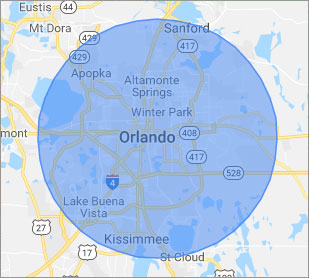
Our primary on-site mobile service areas include the greater Orlando Metropolitan Area and the Phoenix, Tucson, Las Vegas, San Diego, Salt Lake City, Denver, Dallas-Fort Worth and Tampa metro areas.

We provide remote and mobile computer repair in Kissimmee, Altamonte Springs, Apopka, Azalea Park, Belle Isle, Buena Ventura Lakes, Casselberry, Celebration, DeBary, DeLand, Deltona, Dr. Phillips, Fairview Shores, Geneva, Goldenrod, Hunter's Creek, Lake Butler, Lake Mary, Lockhart, Longwood, Maitland, Meadow Woods, Oak Ridge, Ocoee, Orange City, Orlando, Oviedo, Pine Hills, Saint Cloud, Sanford, Southchase, Union Park, Wekiva Springs, Windermere, Winter Garden, Winter Park and Winter Springs.

Our on-site Computer Service Area

What should someone expect that hires you for Computer Service?

Our mission is to fully resolve your computer problems quickly and affordably. If you want a Computer Engineer that can fix all of your computer problems instead of a computer tech, a computer geek, a technician or a computer guy that can only fix some of your problems; call us at (407) 801-6120.  

What types of Computer Services do you perform?

We service businesses and business clients in their homes, including:
 
  • Diagnose / repair hardware or software problems
  • Spyware, malware, trojan and virus removal
  • Setup wireless and small business networks
  • Laptop repair, PC repair and Apple repair
  • Hard drive data recovery

Kissimmee Computer Repair Service Contact Information

Kissimmee Computer Repair Service
Kissimmee, FL 34742
(407) 801-6120

Kissimmee Computer Repair Service is a Karls Technology company

* *
*
*
*
  *
* *


*
*
* * * * * * * * * * * * * * *
4.9 / 5 stars from 309 reviews

"Awesome and very fun to talk with!"

Kissimmee Computer Repair Service 5 / 5 stars

"Jason was the epitome of professionalism. He was so knowledgeable as well as thorough. I would use him anytime. I am extremely happy and thank you very much."

Kissimmee Computer Repair Service 5 / 5 stars

"My whole experience was great. Ken was personal as well as professional. He was quick and efficient. I would highly recommend."

Kissimmee Computer Repair Service 5 / 5 stars

"The service was prompt and professional and the price was right! Thank you very much!"

Ahwatukee Computer Repair Service 5 / 5 stars
Best Antivirus Software of 2026: The Ultimate Guide to Cybersecurity Brands

In 2026, the digital threat landscape has shifted. We are no longer just fighting simple viruses; we are defending against AI-generated phishing, sophisticated ransomware-as-a-service, and complex identity theft. Choosing the right antivirus brand is no longer optional—it is the foundation of your digital life. At Karls Technology, we’ve analyzed the top-performing security suites of the […] The post Best Antivirus Software of 2026: The Ultimate Guide to Cybersecurity Brands appeared first on Computer Repair Blog.

Performance Boost by Disabling Memory Integrity

Consumers using Intel’s discrete graphics processor units for personal computers have seen a noticeable performance boost after disabling certain security safeguards. Disabling Windows 11’s Memory Integrity setting is required to increase performance. However, it’s important to remember that, according to Microsoft, Memory Integrity ensures that only trustworthy drivers are installed into the operating system, making […] The post Performance Boost by Disabling Memory Integrity appeared first on Computer Repair Blog.

End of Service for Windows 10 21H1

Windows 10 21H1 will be discontinued in three months, on December 13, 2022, as per a notice sent out to customers by Microsoft. Microsoft announced the end of security updates for devices running Windows 10 21H1 (the May 2021 Update) in an article released on Wednesday. In order to protect themselves from attacks that take […] The post End of Service for Windows 10 21H1 appeared first on Computer Repair Blog.

Gaming Issues on Windows 11

Several players have complained that their games have slowed down since installing the latest Windows 11 OS upgrade. Both stuttering and other glitches cause them difficulty. It’s possible that this speed drop is the result of some apps and games mistakenly activating GPU performance debugging tools. Microsoft has yet to fix this issue in the […] The post Gaming Issues on Windows 11 appeared first on Computer Repair Blog.

Changing Default Browser on Windows 11

Changing your default browser on Windows 11 is really easy. Click on the Start menu, then go to Settings, then Apps, and finally Default Apps. Simply choose your preferred browser and click “Set default” to make it your default browser. Keep in mind your desired default browser is selected in both the HTTP and HTTPS […] The post Changing Default Browser on Windows 11 appeared first on Computer Repair Blog.

Southwest Airlines changes $8 internet prices

Southwest Airlines has recently announced a change in its in-flight internet pricing model, shifting from an $8 daily internet fee to an $8 per flight segment internet access fee. This decision has sparked conversation and interest from consumers... The post Southwest Airlines changes $8 internet prices appeared first on Computer Repair Blog.

Windows Search Tool

Windows search is the most efficient method to utilize when looking for certain files, documents, or applications using a keyword. As a short cut, it gets the job done well. Windows 11 systems use a “magnifying glass” symbol for Windows Search on the taskbar, while Windows 10 computers feature a search box. If you type […] The post Windows Search Tool appeared first on Computer Repair Blog.

Change Windows Update Times

You can alter the the times your computer is available to update. And it’s easy to do so. Schedule Windows Update to begin and end at certain times. The configuration tool may be launched by searching the Windows Update settings. The parameters may be updated to alter the active times. Select new working hours here. […] The post Change Windows Update Times appeared first on Computer Repair Blog.

If Your Computer Won’t Turn On, Here May Be Why

The last thing users need to happen when they’re about to jump on their PC is for it not to turn on. There is a possibility that your computer may not switch on because the power supply is broken or has died. If the computer’s power supply is malfunctioning, the components of the machine will […] The post If Your Computer Won’t Turn On, Here May Be Why appeared first on Computer Repair Blog.

‘What is my IP address’ on Mac

Internet Protocol (IP) addresses are needed for computers including desktops, portable devices, and hosts to communicate with one another via the network. It is important to know where to find the IP address, if it’s needed for any future issues. If you’re needing to find your IP address on your Mac, look no further. There […] The post ‘What is my IP address’ on Mac appeared first on Computer Repair Blog.